Frequently Asked Questions
Find answers to the most frequently asked questions about MyTime
Already a customer? Click here for Merchant Help Center
General
MyTime is the most convenient way to book appointments online with over 2 million local businesses! People come to MyTime to check out the service menus and real-time availability of businesses they want to book. What kinds of things can you get on MyTime? Haircuts, massages, dog groomings, and hundreds of other services!
MyTime is truly a one-stop shop for all the things a person needs in her life. Our award winning website, iPhone App, and Android App have been used by millions of consumers to find great nearby businesses and to book with them 24/7.
The benefit to the many businesses on MyTime is the chance to be discovered by new customers and to generate more sales through our online channel. We also help our businesses retain existing customers who have booked through MyTime through a number of free retention marketing tools, such as appointment reminders, friend referrals, and ratings & reviews.
Are you on MyTime yet? Learn more at http://www.mytime.com/merchants.MyTime currently supports 90+ services in the following categories:
- Automotive
- Health & Beauty
- Home & Garden
- Medical & Dental
- Pets
- Sports & Fitness
- Lessons
Don’t see yours? Email support@MyTime.com with the service you’d like to offer!
You can access your Merchant dashboard at: http://www.mytime.com/dashboard. If you’re not logged in, just click “Login / Register” in the upper right part of our website.
Forgot your password? Click on the “Forgot password?” link after clicking Sign in, and we’ll email you with instructions on how to reset it.
MyTime uses publicly available data such as government records to create and maintain a directory with service-based businesses across the United States. We use information such as the name and address of your business to accurately create the listing.
These public profiles are completely free and MyTime simply contacts the business to let them know they have a booking. We encourage these businesses to claim their profiles on MyTime so they can update and manage their profiles as they see fit. We also ask business owners to connect their third-party software calendars to MyTime so customers can book directly through a MyTime profile and it syncs with their third-party calendar automatically! Through this process, we’ve built the largest network of calendar connected businesses in the world, furthering our mission to show real-time appointment availability and to enable online booking for millions of local businesses!
Want to learn more about the benefits of claiming your profile?
Visit http://www.mytime.com/merchants.
Claiming your profile is easy! Simply find your profile and click the link that says, “This is my business.” Or, visit www.mytime.com/merchants and fill out the short form. One of our business representatives will be in touch ASAP.
You can also reach us directly at (385) 233-6964, by email at team@mytime.com or via chat anywhere on MyTime.com.
Claiming your profile gives you direct access to the millions of people who visit MyTIme.com and the hundreds of millions of people who visit our online booking partners, such as Google, Facebook, and Bing. Not only will people be able to find your business more easily, they'll be able to view your real-time availability and request appointments. Greater exposure and online booking from the places your customers visit is the single best way to grow your business.
You can sign up for free at http://www.mytime.com/merchants/marketplace or contact us directly at (385) 233-6964.
Getting Bookings Through MyTime
If you have not claimed your profile: Our professional concierge team will call you every time a customer requests an appointment with you via MyTime. Our goal is to connect our massive user base with great businesses like yours.
If you HAVE claimed your profile: You’ll receive an email and/or text message as soon as a customer books an appointment with you. We’ll remind the customer about their upcoming appointment 24 hours beforehand.
Post-appointment, we’ll ask for a review, and remind them to share your business with friends.
If the customer pre-paid for the appointment through MyTime: You’ll get paid by MyTime within 7 days of the appointment. Remember, customers that pay through MyTime can also leave a tip via MyTime!
If you have NOT claimed your profile: Our professional concierge team will contact you with the details of the requested appointment, including the customer’s preferred times, the service they’d like to receive, and the customer’s contact details. If you’re available during their preferred times, we’ll let the customer know the appointment is confirmed.
If you HAVE claimed your profile: You can request appointment notifications via email, text message, or phone call from your Business Info page.
You choose whether to accept online payment through MyTime. When MyTime has collected payment from a customer, we verify that they've paid in your appointment notification email. If you choose not to accept online payment, customers pay you directly.
If you haven’t claimed your profile: Our concierge team will contact you as soon as a customer cancels their appointment with you.
If you have claimed your profile: We’ll notify you via email as soon as a customer cancels, and encourage them to reschedule their appointment with you.
If the customer has paid for the appointment via MyTime: You can restrict cancellations to 1-7 days before an appointment, or let customers cancel up to their appointment time. If a customer cancels in accordance with your policy, we'll refund their money. If they don't give you the amount of notice you've selected, you still get paid for their appointment. Set your policy on the Settings page.
Syncing With Third-Party Calendars
Yes! We can sync with Google Calendar, Microsoft Outlook, Apple iCal, iPhone/iPad, Android devices, and many more.
When your third-party software calendar is synced with MyTime, we'll only show your open appointment times to customers. And when a customer books an appointment through MyTime, we'll instantly enter it directly into your software calendar so everything stays synced.
Our customers prefer instant confirmations when they book on MyTime. When your calendar is connected to MyTime, we’ll show a lightning bolt icon next to your business name in search results to signify instant confirmation. You’ll also rank higher in the search results. Our most successful businesses have synced their calendars to MyTime - it’s a better experience for the customer and a more seamless experience for you!
Absolutely! When an appointment comes in, we’ll ask you to confirm the time via email, text message, or your Appointments page. If at any point you decide you’re ready to move away from pen & paper, our service team will be happy to set you up with a free web calendar, which will make MyTime work even better for you!
Interested in setting up a free software calendar today? Contact our team at support@MyTime.com OR (385) 233-6964.
We’re continually adding support for more third-party calendar systems that can be synced with MyTime. If we don’t support your system, you can put in a request for it by visiting your Availability page and clicking “Sync Calendar”. Choose “Other”, and let us know what you use. We’ll add it to our list and prioritize it accordingly as we receive more requests for that system.
Until you have a synced calendar with MyTime, we will ask you to confirm the pending appointment via email, text message, or via your Appointments page.
Getting New Customers on MyTime
Millions of potential customers visit MyTime looking to book appointments with businesses like you! When you claim your profile, customers can read more about your business, see your real-time availability and prices, and instantly book an appointment.
If you’re looking for new customers, we suggest you Promote your business. More than 80% of businesses on MyTime choose to promote because it’s risk free and it works!
Learn more about Promotion here: http://www.mytime.com/merchants/
There are many benefits to Promoting on MyTime, and it never costs you money out pocket! If we don’t deliver, you don’t pay a thing. Here’s how we promote your business:
- Better visibility on MyTime browse and search results
- Free advertising on Google, FB and Twitter to drive more traffic to your MyTime profile
- Inclusion in MyTime email newsletters and “recommended for you” sections on the website
- Ability to enable off-peak pricing to automatically discount your hard-to-fill appointment times (optional)
- No out-of-pocket costs
If you choose NOT to promote, you will still be listed on our website. We don't spend money to advertise you, but your loyal customers and people searching for your business can still find and book appointments with you on MyTime.
If you are promoting, you can choose to discount your hard-to-fill appointment times with off-peak pricing. You tell us the specific slow days and slow times you'd like to discount and then select the price floor (the lowest price you would be willing to accept). Think of it as a “happy hour special” to get new customers when you need them most!
The off-peak pricing feature is available FREE where you’ve opted into Promotion.
Of course! You can see the name, phone number, email address, and service booked for every customer who books an appointment with you on MyTime. Upcoming and past appointments are all recorded in your merchant dashboard.
Retaining Existing Customers on MyTime
We make sure your existing customers come back again with a powerful suite of free automated marketing tools:
- Reminders when it’s time for customers to rebook their next appointment with you
- Upcoming appointment notifications via email or text message
- Review requests after every successful appointment, which improves your search ranking
- Refer-a-friend incentives including a $20 credit at your business whenever a customer refers someone to you (we cover the $20!). Note: Only available to businesses who accept payment through MyTime.
- Free 'Book Us Online' button for your website so customers can book you 24/7
Some businesses may also be eligible for $2,500 in gift card giveaways: We send you 250 $10 gift cards to offer to your customers (on us!) and a customized tabletop sign to hold them.
Learn about all the retention tools MyTime offers by visiting us here: http://www.mytime.com/merchants
MyTime's Pricing Plans
It's completely FREE to list your business on MyTime. If you’re looking for more customers, we recommend trying one of our paid Promotion Plans. The best part about our Promotion Plans? There’s no money out of pocket. This means that if we don’t deliver customers, you don’t have to pay!
See a complete breakdown of MyTime’s pricing and feature list here: http://www.mytime.com/merchants/pricing
Note: If you have an Unclaimed Profile, MyTime is always completely free. Customers will request appointments, we’ll call you to let you know, and the customer will pay you directly after their appointments.
Accessing Your Account
You can access your Merchant dashboard at: http://www.mytime.com/dashboard. If you’re not logged in, click “Login / Register” in the upper right corner of our website.
Forgot your password? Click the “Forgot password?” link after clicking Sign in, and we’ll email you with instructions on how to reset it.
How MyTime Works for Consumers
We are the most convenient way to book appointments with over 2 million local businesses, 24/7. You can schedule an appointment for a haircut, massage, dog grooming, and hundreds of other services with nearly any business in your city! Best of all, you can book your next appointment 24/7, even when the business has closed for the day! And thanks to our award winning website and mobile apps, you can book from anywhere. Appointments booked through MyTime can easily be rescheduled or canceled without needing to call the business directly. With MyTime, we make it easy to organize your life when it’s convenient for you. How is all this possible? Businesses list their services and prices, and sync their software calendars to MyTime so you can see their real-time availability all in one place. Some businesses even allow you to pay directly through MyTime (don’t worry - we won’t charge your credit card until after the appointment takes place). Want to save some money? Look for our exclusive discounted off-peak appointment times. These savings are not available anywhere else. You’ll save up to 60% off normal prices by booking off-peak times marked with a sale tag. It’s like a happy hour for services! Have some businesses in mind that you already love? Just add them to your MyTime Favorites. You can rebook them in 1-click, get reminders when you’re overdue, get notified about discounted appointment times, and more! Booking appointments doesn't need to be a hassle. Let MyTime be your one-stop destination to easily book the things you need done in your life.
MyTime is your one-stop destination for all types of appointments in your city! We have over 80 different services, ranging from acupuncture to yoga. Some of our most popular services include haircuts, massages, dog grooming, and waxing. But, you can find practically anything you’re looking for in these 7 categories: Automotive, Health & Beauty, Home & Garden, Lessons, Medical & Dental, Pets, and Sports & Fitness.
We offer this wide variety of appointments so that it’s easy for you to book and keep track of everything in one place. Our goal is to make your day-to-day life easier, and your to-do list shorter!
For businesses that don't take payment through MyTime, we book and confirm your appointments for free! You'll simply pay the business directly at the time of service.
Booking on MyTime
We recommend choosing a business based on a location convenient for you and great MyTime reviews (these are 100% verified appointments that took place through MyTime). Looking for a new business? Keep an eye out for exclusive sale times, often offered during off-peak hours.
Yes, you can book appointments with your favorite businesses on MyTime. Make sure you select that you are an “Existing Customer” so we can let them know you're coming back!
For business-specific questions, use the “Ask a question” button right next to the map on each business’s profile page. These questions get forwarded directly to the business so they can respond. You can also ask your question using the notes field when requesting an appointment. (The notes field comes right after you select the appointment times). Our concierge team will make sure we get the answer from the business ASAP.
For questions about MyTime or how our product works, feel free to reach out to our awesome customer service team. You can reach us in 3 convenient ways:
By phone: (385) 233-6964
By email: support@MyTime.com
By chat: Click ‘Chat with us’ in the footer of the website from 8:30am-5:30pm Pacific, Mon-Fri
For many businesses on MyTime, you can book an appointment and get instant confirmation (look for the lightening bolt icon on the business’s profile page). This is because we are connected directly to their calendar system and can show their real-time availability.
For businesses who have not connected their software calendar to MyTime, you can still request an appointment. Our fabulous concierge team will contact the business during their operating hours to book your appointment for free, and send you a text message or email when it’s confirmed. Please choose multiple appointment times that work for you; that way there is a higher chance of confirming your appointment time. With MyTime, you'll never have to pick up the phone to make an appointment again!
For businesses who have connected their calendar to MyTime, confirmation is often instantaneous (look for those businesses with a lightning bolt icon next to their name)! For all other businesses, we try to confirm your appointment in a matter of minutes. Sometimes it takes longer if the business is closed for the day or if they don’t answer their phone. You can always check the status of your appointments on the Appointments tab.
Nope, no need to call the business. We’ll let them know you’re coming and confirm with them the day of the appointment! If there are any updates or changes, the MyTime team will reach out to you directly.
Looking for exclusive sale pricing? Go to the search page at www.mytime.com/search and click on Show Filters. Click the checkbox that says “Times on sale.”
Don’t see any sales near you? Keep checking back - we’re adding thousands of businesses each month!
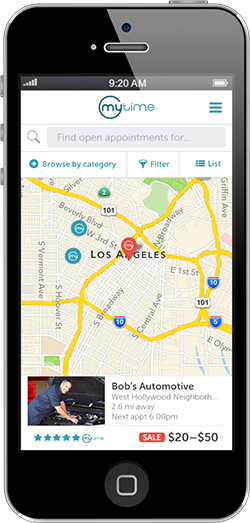
When there is a price range, it’s because a service can have different prices depending on the options you choose. For example, a 30 minute Swedish massage is less expensive than a 60 minute Swedish massage. If you see a red price tag next to the price range, this means there’s a sale price on selected appointment times (but not necessarily others). Sometimes the sale price is only on a specific service - other times the sale price is only for certain times in the day. It’s really up to the business!
Even if no pricing is displayed, you can still request an appointment. If you’d like to know the price, you can ask for it in the notes section and we’ll email or text you the price. Also keep checking back on MyTime - we’re adding price menus for businesses all the time!
Yes, there are a couple of ways to book multiple appointments at once:
- Buy a package and save! For businesses who take payment for their services through MyTime, you’ll have the option to buy a package. These packages are always offered at a discount to buying the appointments individually, and can be paid for and redeemed exclusively on MyTime. We’ll keep track of how many appointments you have left, and remind you when it’s time to rebook.
- Make your appointments recurring. Are there certain services you get on a regular basis (like house cleaning or manicures or dog walking)? Set up a recurring appointment through MyTime so you don’t have to rebook every time! We’ll set all the appointments up for you, and remind you when they’re coming up. It’s easy to reschedule or cancel individual appointments from your Appointments page (www.mytime.com/appointments).
Taxes are generally included in the price, but gratuity is not. If you paid for your appointment through MyTime, you’ll be prompted to add a tip after your appointment. Look for our text message asking how much you’d like to tip, and text us back the amount (e.g., $10). We’ll make sure this is added to the total charged to your credit card and pass it on to your provider directly.
We understand that sometimes your schedule changes. You can reschedule or cancel your appointment from the MyTime website or mobile app. Some businesses on MyTime require advanced notice to cancel or reschedule appointments (usually 24 hours, but up to a week). Check your confirmation email for each business’s specific requirements.
If you paid for the appointment via MyTime, your credit card is not charged until after the appointment takes place. However, we still have to place a hold on your card to ensure we can charge it after the appointment. In the event of a cancellation, your bank will remove the hold from your credit or debit card in 1-7 days.
To cancel and/or reschedule your appointments you can visit your Appointments page or email support@mytime.com with the details of your request.
Payment through MyTime
Some businesses on MyTime require a credit card to reserve your appointment time. For these businesses, payment for the service will go through MyTime but your card won’t be charged until after the appointment takes place. We accept Mastercard, Visa, American Express, and Discover. Entering your credit card information on MyTime is 100% secure and encrypted.
For all other businesses, MyTime will not ask you for a credit card. You will pay these businesses directly at the time of the appointment.
If you’ve booked an appointment with a business that requires a credit card, we collect your credit card information when you’re booking an appointment, but we don’t charge it until 1 hour after the appointment. Please note, if you’re using a debit card, your bank may place a hold on your account for the amount of the appointment. In the event of a cancellation, your bank will remove the hold in 1-7 days.
For businesses who don’t take payment through MyTime, we will not collect or charge your credit card. You will pay these businesses directly at the time of the appointment.
If you booked and paid for your appointment through MyTime, you can easily tip via text message after your appointment. MyTime will text you after your appointment, and ask if you’d like to leave a tip. You’ll have 1 hour to text us back the dollar amount (e.g., 10). We’ll add the tip amount to the price of the appointment. You’ll see one charge on your bank statement that includes the service you received plus the tip.
For businesses who don’t take payment through MyTime, you should tip the business directly at the time of the appointment.
If you added a tip via text message (available only for businesses who take payment through MyTime), you might temporarily see two charges from MyTime. The first charge is the hold for the original appointment you booked. The second charge is for the appointment + your tip amount. As soon as you leave a tip, we’ll automatically release the hold for the original appointment. However, if you’re checking your balance online, you may temporarily see an overlap of two charges until the release is processed by your bank. This release usually takes place at the end of the day, or the next morning if you added your tip after banking hours.
Other
MyTime is not affiliated or endorsed by Yelp. We only display ratings from Yelp. For any issues or questions regarding any appointments booked or requested through MyTime, please contact MyTime and not Yelp. MyTime support can be reached at (385) 233-6964, by email at support@MyTime.com, or by chat from any page on this website.
We're happy to help! You can reach us in 3 convenient ways:
By email: support@MyTime.com
By chat: Click ‘Chat with us’ in the footer of the website from 8:30am-5:30pm Pacific, Mon-Fri